
Polaris
Members
-
Joined
-
Last visited
-
The Poltergeists Polyphonic: No, I do not create live versions of my AI creations. I don't have access to a band, nor can I play conventional musical instruments such as pianos and whatnot. My hope is that the AI remixes are as good as anything I could reasonably expect to get out of a live band.
-
I composed this lovely piece today and remixed it with Suno. It turned out really, really good, in my opinion. I've finally hit on what works compositionally, and I've been trying to push the limits of what I can do with music, with this piece being one of my best. Thank you for you kind words! Yes, I do indeed compose the original source material. The music comes out far better that way--more emotional and more suited to one's own tastes--provided you know what you're doing composition-wise. You mention that the biggest challenge with AI music is how cliched its output can be, and I agree 100%. All AI can do is repeat patterns it has been exposed to, with an added element of randomness. It's essentially a glorified copying machine. This is why, as I mentioned, I like to feed it my own music. When one feeds it one's own music, it takes on a role more akin to a spell check or a hired sound remixing specialist, the latter being something to which most professional composers turn, remixing being a different animal than composition, one that most composers never master (in both senses of the word "master"), myself currently very much included. To answer your question, I'm not entirely sure what you mean by reversing the process to humanize the production. Could you explain?
-
I've never taken more than one, maybe two days to compose anything. But then my pieces tend to be a little on the shorter side, rarely exceeding a few minutes in length.
-
Three pieces that I composed and then remixed with Suno:
-
I would recommend not tuning the harpsichord to be so far out of keeping with modern concert pitch, as those of us with absolute pitch are likely to find it highly distracting, while those who do not possess the ability won't derive any advantage whatsoever from the peculiarity of tuning. Aside from that, I thought this was an excellent fugue, in spite of the fact that you say you wrote it as a joke. Most modern writers of counterpoint churn out music that sounds aimless and more or less random, whereas this feels goal-directed, as music should.
-
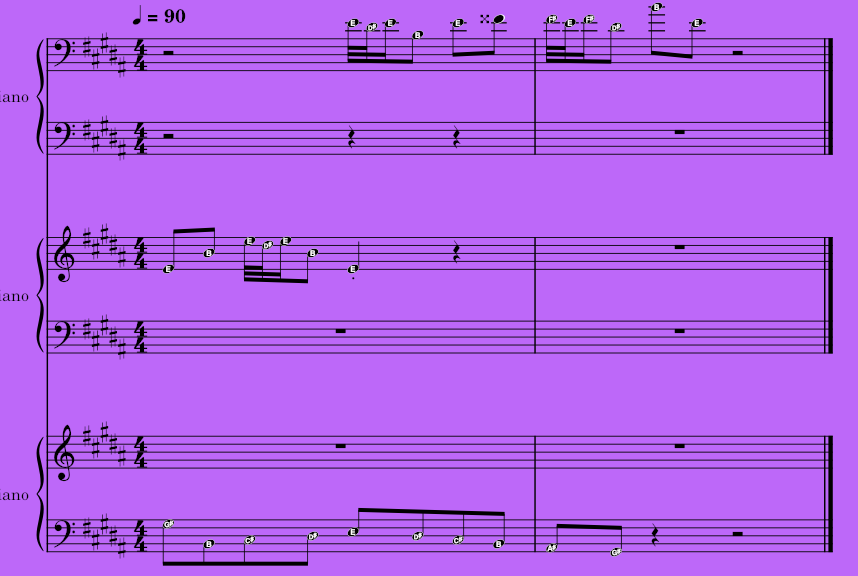
Writing a good melody is difficult. Writing a pair, a trio, a quartet of melodies that can be played all at the same time to good effect is astronomically difficult. One has to observe several different rules, many of which are quite restrictive, such as avoiding parallel Perfect Fifths and handling dissonances properly. Yesterday, I sat down to a project that I had long wanted to start. With the help of Google Gemini, I began writing the code for a computer program that turns what is astronomically difficult into a quick and simple matter. The program is now more or less entirely complete. What does the program do? It takes as input a folder full of MIDI files, each containing a melodic passage and, in a matter of seconds, finds potentially dozens of superimpositions of these melodies that follow the rules of good counterpoint. Different combinations of these melodies, along with simple transformations of these melodies (i.e. time-delayed versions, transposed versions, sped-up versions, and slowed-down versions) are quickly tested, one after another, and those that pass are added to a pool for the user to listen to and export for use in larger works. The user can also force the program to try combining melodies with one specific melody (possibly including itself) rather than combining them entirely at random. All of this makes the program ideally suited for writing compositions that involve not only counterpoint but extensive imitation (imitation means the repetition in one voice/instrument of a melodic idea that appears in another voice/instrument), such as appears extensively in that venerable type of music called the fugue. Right now, my task is simply to compose as many different pleasant-sounding melodic passages as possible, so that I can feed these to the program and have it superimpose them in ways that I never would have come up with without its assistance. For those interested, the code makes use of a genetic algorithm and an artificial intelligence that learns how to avoid melodic combinations that are likely to fail, based on prior experience, speeding up the program's workings and improving the quality of its output. Here is a screenshot of a very short and simple passage that this program wove out of three motifs. The harmony in this passage is almost entirely two-voice, but the program can write passages that are arbitrarily dense, up to the point that it would be theoretically impossible to thicken the musical texture without breaking the rules of counterpoint. It can also write much longer passages, although listening through them would become increasingly time consuming as they got lengthened. Much better to write short passages and weave them together within a larger work. (You'll notice that there is one perfect consonance by similar motion. I decided to permit this because it isn't strictly forbidden, and in some cases is unavoidable. The program is coded only to rule out completely those passages which break the hard rules, such as ones that include parallel Octaves and unacceptable handling of dissonance. If the program writes a passage that breaks a suggestion rather than a hard rule, and the user doesn't like this, the passage may simply be discarded. I kept this one because I like how it sounds.)
-
Last night, I discovered the magic of Suno's user-designed models feature. Basically, what you do is upload several tracks of your own creation, and this teaches Suno to cater to your tastes and mimic your style. Using this feature has, for me, tremendously improved my satisfaction with Suno and the quality of the site's output. Please do give the following tracks created with this feature a listen:
-
Candlelit Catacomb Ball
-
A Grand and Ghastly Meal in Tartarus Version IX:
-
Check this puppy out. Very pleased with it indeed.
-
Updated the above post with some more canon-fugues based on J. S. Bach's Well-Tempered Clavier. Listen and enjoy.
-
Four Canon-Fugues using fugues from J. S. Bach's Well-Tempered Clavier
-
A Canon-Fugue consisting of J. S. Bach's Fugue in B minor placed in canon with itself.
-
The Ancient Three (A three-voice canon)
-
A canon on the Glad Dirge of the Four